CRM for a Real Estate Agency: How Properties, Viewings and Commission Work in Mestra
Reviews10 min read
CRM for a real estate agency: property and client cards, matching, viewings, offers, deposits, mortgages, commission splits, Avito, CIAN and DomClick.

A CRM for a real estate agency is a database of properties and clients where every viewing, every price offer and every ruble is visible: what is the property price, what is the deposit and what is the agency's commission. An ordinary sales CRM can't do this: it sees one deal with one amount.
An agency loses money not on advertising but on gaps: a CIAN response went to an agent's personal phone, nobody called back after a viewing, an exclusive agreement expired, and the commission "stayed in the head" of the manager. Below is what should be inside the system and how it's done in Mestra.
One-minute check
- Open a property card: does it have a price per m², the owner, the commission and the exclusivity term?
- Open a client card: can you see their budget, mortgage and a parallel sale of their own flat?
- Find the viewing history: who, when, what the client said and why they declined.
- Look at analytics: is the commission counted as income, or the whole deal price?
- Check where responses from classified sites arrive — in the shared feed or in an agent's personal messages.
The property: a card that replaces a spreadsheet
In Mestra, the Products section for real estate is called "Properties", and the button is "Add property". The property card has:
| Block | What's filled in |
|---|---|
| Basics | Type: flat, house or cottage, townhouse, commercial, land plot, new build, resale. Status: for sale, long-term rental, daily rental, reserved, sold, rented. Owner — a link to the seller client's card |
| Price | Price for the whole property, per month or per day. Price per m² is calculated automatically. Terms: mortgage, instalments, full payment |
| Property | Total and living area, kitchen area, rooms, bathroom, floor and number of floors, building type, year built, renovation, cadastral number |
| Location | The address — district and metro are filled in automatically |
| Listing | Agency commission (% or ₽ and who pays: buyer, seller, both), listing IDs on CIAN and Avito, exclusivity agreement term |
| Documents | Type of title: an extract from the property register (EGRN), a contract, documents being processed |
Different types open their own fields. A land plot has land use and utilities (water, electricity, gas, sewerage, internet). Commercial property has its purpose, building class, ceiling height, loading area and separate entrance. A new build has the developer, completion percentage and handover date.
The exclusivity term goes straight into the calendar: the agent gets a reminder in advance rather than learning from a competitor that the agreement has ended. The property card shows its statistics — for example, "12 viewings, 3 offers": it's easier to explain to the owner why the price should be reconsidered.
The client: type, budget, mortgage and a parallel sale
A real estate client card differs from an ordinary one. The client type is buyer, seller, tenant, landlord, investor or agent. Each client has an assigned agent and a source: CIAN, Avito, VKontakte, Yandex, website, referral or an office visit.
The Preferences tab includes:
- budget, area from and to, number of rooms, districts and distance to the metro;
- mortgage: bank, approved amount, down payment, maternity capital;
- chain deal — a "yes" flag and a link to the property the client is selling at the same time.
A chain deal is a common reason deals fall through at the last moment: the buyer can't pay until their own flat is sold. When both deals are linked in the system, the agent sees the whole chain.
Matching properties and sending them to the chat
On the Matching properties tab, Mestra compares the client's preferences with the database and shows the matches. The "Send to chat" button sends the selection to the client's messenger — in the same conversation they wrote in. When a property is sold, it disappears from selections automatically.
History: viewing → offer → deposit → deal
The main difference from a sales pipeline is the History tab in the client card. It holds not one deal but linked records:
| Record | What it captures | Statuses |
|---|---|---|
| Viewing | Property, date and time, agent. A "Property viewing" event is created in the calendar | Scheduled → Took place / Cancelled / Client didn't come |
| Offer | The offered price and its deviation from the asking price in percent, payment terms, deadline | Sent → Accepted / Rejected / Counter-offer |
| Deposit | Amount, date, the deposit agreement file | Held by the agency → Passed to the seller / Returned / Retained |
| Deal | Property, type (purchase, sale, rental), price, commission, mortgage, registration date | In progress → Contract → Registration → Closed / Fell through |
After a viewing, the system asks "How did it go?". The agent rates the client's interest on a scale of 1 to 5, records feedback by text or voice and, if the client declined, gives a reason: too expensive, location, condition, layout, floor. Mestra then suggests the next step: for "Liked it" — a "Make an offer" button; for "Not right" — "More options to chat". Six months later, the reasons for refusal show which properties are overpriced.
A counter-offer is created as a separate record under the original offer, so the whole negotiation is visible step by step. When an offer is accepted, Mestra suggests creating the deposit and the deal straight away.
Money: turnover, deposit and commission
A buyer pays 15,000,000 ₽ for a flat. The agency earns a commission — 3%, or 450,000 ₽. If the CRM records the whole deal price as revenue, the head sees "15 million in revenue" and makes decisions based on wrong numbers.
In Mestra, every amount has a type:
- the property price — turnover, not the agency's income;
- the commission — the agency's revenue;
- the deposit — pass-through: the buyer's money that the agency passes to the seller.
Under the Russian Civil Code (Articles 380–381), a deposit confirms the parties' agreement: if the deal falls through because of the buyer, the deposit stays with the seller; if because of the seller, it is returned double. It doesn't belong to the agency. If under the contract part of a retained deposit is due to the agency, only that part counts as income.
The "Invoice the commission" button in the deal card creates an invoice for the commission amount only, not the price of the flat. In the profit and loss report, turnover and revenue are separated automatically.
Splitting the commission between agents
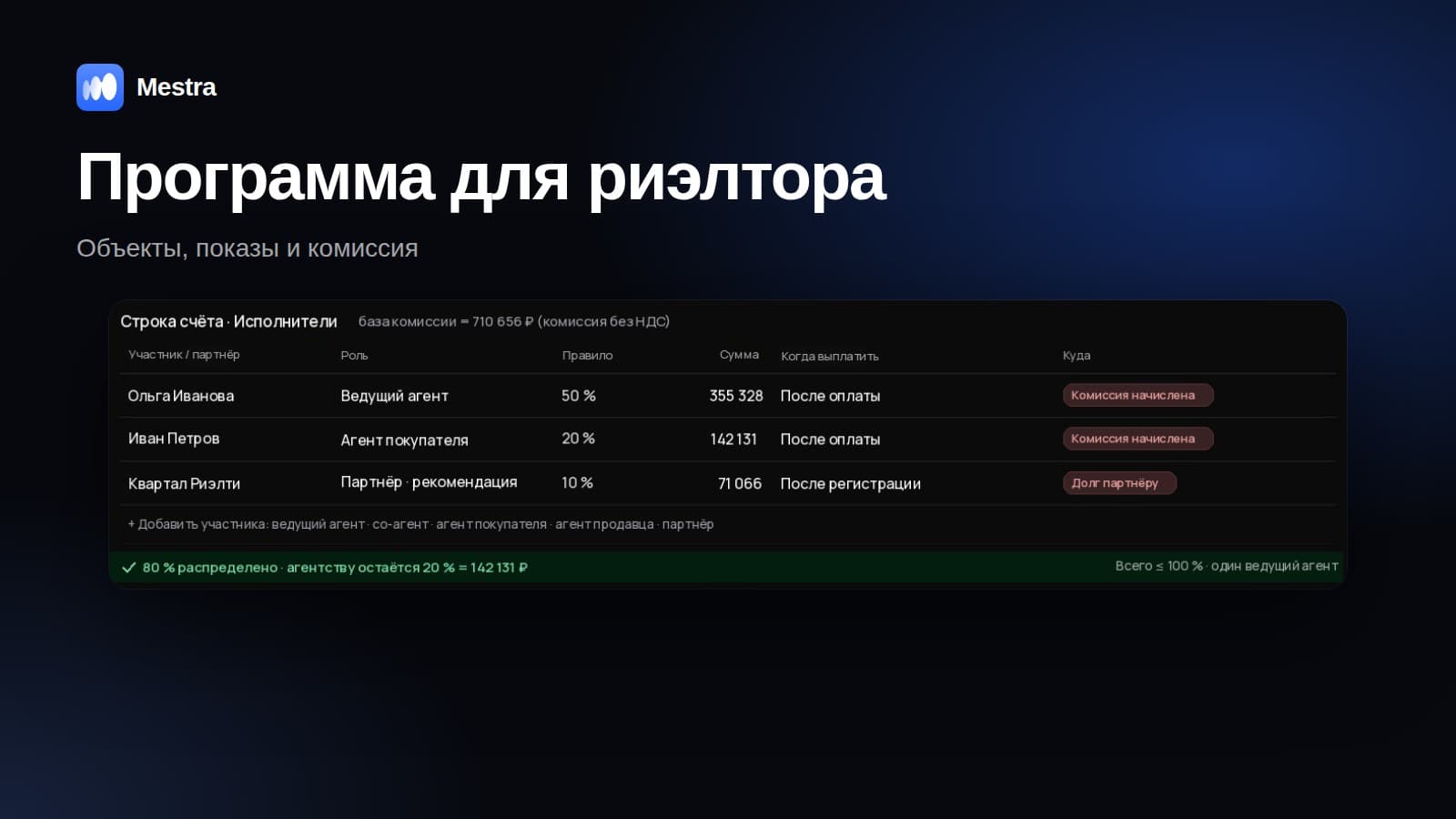
If two agents handled the deal, the commission is split in the deal card: for example, Olga — 60%, Ivan — 40%. With a 450,000 ₽ commission, Olga is credited 270,000 ₽ and Ivan 180,000 ₽. The shares go into staff payouts after the invoice is paid, so there's nothing to argue about at the end of the month. More on the calculation in our article realtor's commission.
Stages of working with a client
The process template for a sale looks like this: new lead → qualification → viewing scheduled → offer → negotiation → contract → mortgage and payment → registration and key handover → post-deal support. There's a separate template for rentals. Stages can be added, removed and renamed, and you can create your own templates — for example, for new builds and for country property.
It's convenient to keep the Rosreestr registration date in the deal: the transfer of property ownership is registered by the state under Federal Law No. 218-FZ, and until that date the deal isn't closed. If the buyer pays in parts, a payment schedule is set on the invoice, and the client automatically gets reminders before each date. The stages are covered step by step in our article the stages of a flat sale.
Classified sites and messengers in one feed
A buyer writes to several agencies at once and goes with whoever replies first. In Mestra, responses and messages from Avito, CIAN, Yandex Real Estate and DomClick arrive in the shared feed next to MAX, Telegram, WhatsApp* and VKontakte. The reply goes to the client through the same channel they wrote from, and the conversation is saved in the client card — even if the agent leaves.
Listings are published to the sites straight from the property card, and the status is synchronised: when a property is sold, it's removed from all sites in one action.
The AI assistant answers questions about properties around the clock, books viewings in the agent's free time and, after a viewing, asks the client for their impressions — the answer is saved in the history.
What the agency head sees
- the agency's revenue from commissions, not property prices;
- agents: the number of viewings, offers and deals, response speed, conversion;
- sources: which site brings clients who reach a deal;
- branches: a comparison of offices and "own branch only" access for agents.
The financial side is covered in detail in our article real estate agency finances.
How it works in Mestra
At sign-up, choose the "Real estate" industry — the property and client forms, viewing history and sale and rental process templates appear straight away. Real estate sites (Avito, CIAN, Yandex Real Estate, DomClick) are connected from the Standard plan — 1,090 ₽ per user per month incl. VAT. The AI assistant is also available from the Standard plan. Users can be added without limits.

Related reading: publishing listings to Avito and CIAN from a CRM.
FAQ
How is a CRM for a real estate agency different from an ordinary CRM?
An ordinary CRM sees one deal with one amount. In real estate, a client has many viewings and offers, the property price isn't the agency's income, and the deposit is pass-through money. You need property cards, matching and a viewing history.
Can you manage both sales and rentals?
Yes. A property has sale, long-term rental and daily rental statuses, the price is set for the whole property, per month or per day, and each line of business has its own process template.
What happens to clients if an agent leaves?
Clients, conversations and viewing history belong to the agency. The head reassigns clients to another agent, and work continues from the same point.
Is Mestra suitable for an independent realtor?
Yes, though an independent realtor usually only needs properties, clients and matching. More on this in our article software for realtors.
Bottom line
A CRM for a real estate agency pays off when it shows the truth: which viewing led to an offer, where the deposit is and how much commission each agent earned. Try Mestra free for 15 days — no bank card required.
WhatsApp is owned by Meta, which is recognised as extremist and banned in Russia.